Go From Alert to Answer in Minutes
Every investigation starts by gathering fragments from systems never designed to connect. Cyberhaven skips that step. Data Lineage is a continuous record of every data action, so the chain of custody is already assembled when an investigation opens. Analysts start with understanding, not reconstruction.
Why Security Investigations Take So Long
The tools most organizations rely on for investigations were not built to answer the questions investigations actually require.
Every Investigation Starts From Scratch
When an alert fires, analysts spend the first hours or days reconstructing what happened before they can assess what it means. That means pulling logs from the SIEM, querying EDR for process activity, checking IAM for access events, and requesting device information from IT. By the time the picture comes together, the window for containment has often already closed.
Most Tools See Where Data Ended Up, Not How It Got There
Network tools capture outbound transfers. Cloud storage tools log upload events. DSPM tools surface overexposed files. None of them answer the question that determines incident scope: “How did this data get here, who touched it along the way, and what did they do with it?”
AI Tools And Agents Leave No Trace In Standard Security Stacks
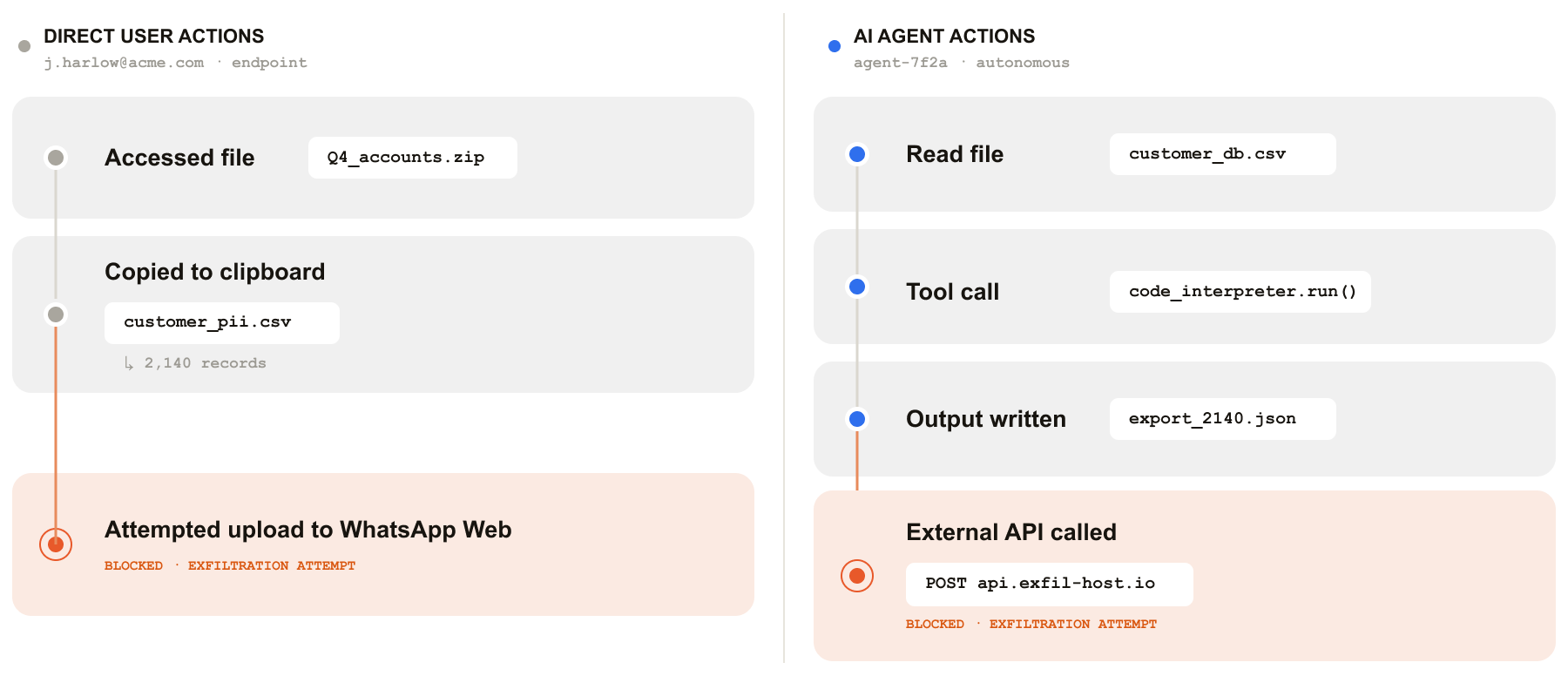
When an employee pastes proprietary data into a generative AI tool, or when an AI agent reads a sensitive file as part of an automated workflow, those actions generate no file transfer events, no email headers, and no network alerts that legacy tools are configured to catch. The exfiltration channel is invisible.
How Cyberhaven Accelerates Investigations
Cyberhaven maintains a continuous, complete record of every data action across endpoints, SaaS, cloud environments, email, AI tools, and AI agents. When an investigation opens, the evidence is already assembled.









Investigations in Action
Security investigations rarely arrive with clear labels. Here is what Cyberhaven surfaces across the scenarios that matter most.
The investigation features that give security, legal, and HR teams a complete, defensible record of what happened.
Cyberhaven Analyst Plugin
AI-powered investigation assistant that lets analysts describe what they want to investigate in natural language, without manually querying incidents, cross-referencing users, or building timelines.
Shadow AI Discovery
Assembles the full event sequence before, during, and after an incident from a continuous data lineage record. No manual log correlation required.
Screen Recordings
Captures what was happening on the user's device in the 30 seconds before an incident occurred, providing behavioral context for the event.
Forensic File Capture
Stores a copy of the data involved in each incident for review and evidence purposes. Organizations can optionally store file evidence in their own cloud environment.
Remote Forensics
Records every user and agent action related to every piece of data and stores it securely in the cloud, enabling post-incident investigation without physical access to a device.
Obfuscation and Evasion Detection
Surfaces rename, compress, encrypt, and file extension change actions as a connected event chain, so deliberate evasion attempts are visible within the incident record.
AI and Agent Activity Reconstruction
Traces data through AI tool interactions, clipboard events, and AI agent workflows, reconstructing the full execution lifecycle the same way a human user investigation is conducted.
SIEM, SOAR, and API Integration
Delivers Cyberhaven incidents to Splunk, QRadar, Exabeam, and any third-party tool through native integrations and an open API. Supports automated response workflows through the Torq integration.
Linea AI
Uses behavioral analysis to detect anomalous data movements and prioritize the incidents that matter most, surfacing risks that static rules miss and giving analysts context for faster triage.
Data Security for the Agentic Enterprise
Cyberhaven Flow traces the full lifecycle of data and adapts protection to changing context
Frequently Asked Questions
What is a data security investigation and what does it involve?
A data security investigation is the process of determining what data was involved in a potential incident, how it moved, who had access, and whether the actions taken were intentional or accidental. A complete investigation answers four questions: what data was at risk, what actually happened to it, who was responsible, and what the exposure scope is. Effective investigations require a continuous chain of evidence connecting data origin through every action to its final destination, across users, applications, AI tools, and endpoints.
How does data lineage accelerate security investigations?
Data Lineage accelerates investigations by providing a pre-assembled chain of custody that eliminates the manual log correlation step that typically consumes most of an analyst's time. Rather than querying separate systems for network logs, endpoint events, and IAM records and attempting to correlate them manually, analysts open an investigation and find the complete event sequence already assembled, from data origin through every action to the triggering event and beyond.
Can you investigate AI tool and agent activity the same way you investigate user activity?
Yes, with a platform built to cover the full data action surface. Traditional investigation tools rely on file transfer events, network logs, and application activity that AI tools and agents do not generate in standard ways. Cyberhaven traces data through clipboard events, browser-based AI interactions, and AI agent workflows at the endpoint level, reconstructing the full sequence of what an agent or AI tool accessed, processed, and transmitted, with the same forensic fidelity as a human user investigation.
How do you investigate data exfiltration without physical possession of the device?
Cyberhaven captures every user and agent action related to every piece of data and stores that record securely in the cloud as it occurs. When an investigation opens, analysts can access screen recordings, forensic file captures, and complete event timelines without requesting the device from IT or waiting for imaging. Remote forensics capability means investigation does not depend on physical device access, which is particularly important for investigations involving remote employees or former staff whose devices have already been returned.
What is the difference between a DLP alert and a security investigation?
A DLP alert identifies that a policy was triggered at a point in time. A security investigation answers why it happened, what data was at risk, whether the action was intentional, what the full exposure scope is, and what response is warranted. Alerts are the starting point. Investigations are what determine consequence. Most alert-only approaches require hours or days of manual work to build the evidence package an investigation requires. Cyberhaven's lineage-based incident view converts an alert into an investigation-ready evidence record automatically.
How does Cyberhaven integrate with SIEM and SOAR tools for incident response?
Cyberhaven integrates natively with SIEMs including Splunk, IBM QRadar, and Exabeam, and exposes all incident data through an open API that connects to any third-party security tool. For automated response workflows, the Torq integration enables SOAR-style orchestration triggered directly from Cyberhaven incident data, including automated notifications, HR system updates, access revocation triggers, and escalation workflows, without requiring manual handoff between detection and response teams.
.avif)
.avif)

Learn How to Secure the Agentic Enterprise
Our insights on protecting data across human and agent workflows, plus product news, event updates, and opportunities.